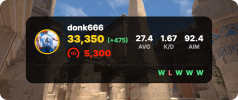
A clean, lightweight, browser-based stats widget for CS2 streamers. Show your live
Premier and Faceit ranks right on stream - no clunky workarounds, no manual cropping,
on a transparent background that drops natively into any layout.
Premier data comes from Leetify and Faceit data from the official Faceit API. Display
your CS Rating, Faceit level and ELO, K/D, aim, headshot %, win rate, and recent match
history. Enter either your Steam64 ID or your Faceit nickname (a nickname auto-pulls
the linked Premier rank).
Key Features
How to Use
1. Open the Live Customizer (link below).
2. Enter your Steam64 ID or Faceit nickname.
3. Pick a design and choose what to show (live preview).
4. Copy the generated URL.
5. In OBS or Streamlabs, add a new Browser Source and paste the URL.
Important Note on Data Refresh: A Leetify account with match tracking enabled is highly recommended for the best experience.
Premier and Faceit ranks right on stream - no clunky workarounds, no manual cropping,
on a transparent background that drops natively into any layout.
Premier data comes from Leetify and Faceit data from the official Faceit API. Display
your CS Rating, Faceit level and ELO, K/D, aim, headshot %, win rate, and recent match
history. Enter either your Steam64 ID or your Faceit nickname (a nickname auto-pulls
the linked Premier rank).
Key Features
- Dual rank: Premier (CS Rating) and Faceit (level and ELO) together, or hide either.
- Live stats: K/D, AIM, Win %, HS %, averaged over your last N matches.
- Recent matches: a visual Win/Loss history of your latest games.
- Designs: multiple rank-colored themes plus compact, vertical, minimal and stacked
- layouts, and a circular "map cover" to hide your in-game radar from stream snipers.
- Cheaters faced today: a best-effort flag of suspicious Premier/Competitive opponents.
- Today's session: net rating gained/lost and your W/L for the day.
- Fully customizable: toggle any stat, use one-click presets, choose what shows - with
- a live preview.
- Zero installation: runs entirely as a Browser Source. No local software, and no login
- or token on the widget page.
- Works with OBS, Streamlabs, and any browser source.
How to Use
1. Open the Live Customizer (link below).
2. Enter your Steam64 ID or Faceit nickname.
3. Pick a design and choose what to show (live preview).
4. Copy the generated URL.
5. In OBS or Streamlabs, add a new Browser Source and paste the URL.
Important Note on Data Refresh: A Leetify account with match tracking enabled is highly recommended for the best experience.
- With Leetify Tracking: The widget typically updates immediately after a match concludes.
- Without Leetify Tracking: Updates may be delayed by 1–2 hours as it relies on standard Steam API sync cycles.
- Live Customizer & Demo: https://www.cs2livestats.com/
- Source Code (GitHub): https://github.com/LevanisART/cs2-premier-stats-widget