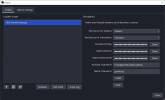
Overview
Displays live viewer counts on YouTube and Twitch, and the total number of YouTube subscribers and Twitch followers. It was originally developed for a client.Note: The YouTube subscriber count is not exact for channels with over 1,000 subscribers: the count is rounded in Google's API. (because Google takes your data, but doesn't want to provide it back)
Features
- Live viewer count from YouTube and Twitch.
- Subscriber count from YouTube and follower count from Twitch.
- Separate or combined text sources for YouTube and Twitch statistics.
Limitations
- Be careful with YouTube API rate limits. Google provides 10,000 points daily. A search call costs 100 points, and updates for viewers and subscribers consume 2 points per minute.
- Pressing the
STARTbutton consumes 100 API points: it is a search call to the YouTube API. Don't press this button too often (ideally you press it only once at the start of the stream). - Running the script continuously for 24 hours will consume approximately 2,880 points.
Installation
1. Prerequisites
- Active accounts on YouTube and Twitch.- OBS 30 installed.
- Python 3.10.6 installed and added to PATH.
Setup Guide
YouTube
1. Channel ID: Your YouTube channel ID is required (not the channel name). Find it at YouTube Account Advanced or for any channel using Comment Picker.2. API Key: Follow this tutorial by WebbyFan: YouTube API Key Tutorial
Twitch
1. Channel Name: This is your Twitch channel name as it appears in your Twitch channel URL.2. API Key and Secret: Follow this tutorial by CaptZorro: Twitch API Key Tutorial
Script Configuration
1. Create text sources in OBS for YouTube and Twitch viewers and subscribers.2. In OBS, go to Tools > Scripts and add the script.
3. Configure the script settings with your API keys, channel IDs, and text sources.
Important: After adding or modifying text sources in OBS, you need to reload the script for the changes to be reflected in the drop-down lists within the script settings. This can be done by right-clicking the script in the Scripts window and selecting Reload.
4. Start your stream on YouTube and Twitch.
5. Click the START button to begin fetching data.
Usage
- The script updates viewer and subscriber counts every 60 seconds.- Press the START button after you started streaming to initialize data fetching.
- Logs are stored in the same directory as the script for troubleshooting.
Platform Compatibility
- Windows: Works on my machine.- macOS: I helped a client run this script successfully on an Apple M1 laptop, but this was tedious because it is hard to make OBS find the right version of Python on Mac. I don't have a Mac machine, so I can't really help with this. Also, I've added logs since this time, so I don't know how Apple handles the creation of text files in their system by OBS scripts.
Contributing
Your suggestions and contributions are welcome! Please feel free to leave feature requests or issues on GitHub, and I'll try to implement them.Acknowledgements
- Thanks to WebbyFan and CaptZorro for their tutorials on API key setup.- A big thanks to hmeneses and his Youtube chat and channel updater for the idea of using urllib.request instead of requests
- Special thanks to xSqne for identifying and reporting the error in the logic of the script.