Advanced Scene Switcher

Advanced Scene Switcher 1.37.2

Hi,

I'm striking an issue between your plugin and the atkAudio plugins Midi Control (another awesome plugin like yours).

That control is mapping my controls to OBS hotkeys via targetUuid which now seems to be changing for your macros that are being registered as hotkeys. They change when I restart OBS or switch scene. This means I need to re-map 8 controls every time one of these events happens.

For instance for "targetName": "Unpause macro ToggleMedia1Mute",
the targetUuid changes from
"targetUuid": "obs_hotkey:frontend:macro_unpause_hotkey_8",
to "targetUuid": "obs_hotkey:frontend:macro_unpause_hotkey_14", when changing scene collection and back
to "targetUuid": "obs_hotkey:frontend:macro_unpause_hotkey_2", when closing and re-opening OBS

I didn't notice this earlier so has something changed?

regards,

David
This has always been the case for those types of hotkeys.
A build with stable hotkey ids for the pause functionality will be available here in a few minutes:
Or alternatively here if you don't have a GitHub account:
Let me know if that works for you!
 
This has always been the case for those types of hotkeys.
A build with stable hotkey ids for the pause functionality will be available here in a few minutes:
Or alternatively here if you don't have a GitHub account:
Let me know if that works for you!
That works, thank you.
 
Thanks @kaaroux for your suggestions!

A build with the option to check if a mouse button is held down is available here:
Or if you don't have a GitHub account here:
1793996476076.png


Not sure about the stylus part though as I can't test it, but I will try to look into it when I find the time to!
 
Hello everyone,

I have a request. I noticed that version 1.32 made Advanced Scene Switcher work with Aitum Vertical. Is it possible to make it work with SE.Live as well?

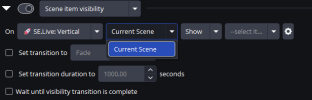
Here's my specific issue: I currently have a soundboard/mixamp (Rodecaster Duo) with MIDI controls. I used advanced scene switcher to show the visibility of a scene source, wait 3 seconds, and hide the visibility of the scene source so I only have to press the MIDI button once. However, I still have to tab out of the game I'm playing in order to manually show the scene, wait 3s, and hide the scene for the vertical stream. I would like this MIDI button to run the macro for the vertical scene as well, but it seems like installing Aitum is the only way to accomplish this. However, I prefer to use SE.Live because of the smoothness of going live without needing a new stream key from TikTok every single stream. Seems like Aitum is better in a lot of ways, but I'm trying to automate more workflow, not manually type in stream titles and whatnot EVERY single stream. Anyways, Aitum vs. SE.Live aside, I would REALLY appreciate the ability to accomplish this. It seems like Advanced Scene Switcher can recognize the Vertical SE.Live canvas, but once you go to select a scene, "current scene" is the only option. Even if you select current scene, it won't let me select any of the sources within the scene, even if you delete all but one of your scenes. So is Advanced Scene Switcher / SE.Live compatibility coming soon? It would be GREATLY appreciated if so.
 

Attachments

  • Screenshot 2026-11-08 155136.png
    Screenshot 2026-11-08 155136.png
    14 KB · Views: 2
Hello everyone,

I have a request. I noticed that version 1.32 made Advanced Scene Switcher work with Aitum Vertical. Is it possible to make it work with SE.Live as well?

Here's my specific issue: I currently have a soundboard/mixamp (Rodecaster Duo) with MIDI controls. I used advanced scene switcher to show the visibility of a scene source, wait 3 seconds, and hide the visibility of the scene source so I only have to press the MIDI button once. However, I still have to tab out of the game I'm playing in order to manually show the scene, wait 3s, and hide the scene for the vertical stream. I would like this MIDI button to run the macro for the vertical scene as well, but it seems like installing Aitum is the only way to accomplish this. However, I prefer to use SE.Live because of the smoothness of going live without needing a new stream key from TikTok every single stream. Seems like Aitum is better in a lot of ways, but I'm trying to automate more workflow, not manually type in stream titles and whatnot EVERY single stream. Anyways, Aitum vs. SE.Live aside, I would REALLY appreciate the ability to accomplish this. It seems like Advanced Scene Switcher can recognize the Vertical SE.Live canvas, but once you go to select a scene, "current scene" is the only option. Even if you select current scene, it won't let me select any of the sources within the scene, even if you delete all but one of your scenes. So is Advanced Scene Switcher / SE.Live compatibility coming soon? It would be GREATLY appreciated if so.
Unfortunately, I am not sure if SE.Live offers the same API functionality as Aitum Vertical.
If you have any info that would be much appreciated! :)

Does this plugin work with a MacOs M5 max Mac Studio ?
I think it should do.
But since I don't have a Mac and am only testing in a VM I can't confirm.
If you face any issues or need support just let me know! :)
 
Last edited:
I just wrote SE.Live a ticket request. I requested information on API, which I don't know much about. So I told them how to find this forum in hopes they'll reach out to you themselves. If not, hopefully they'll give me enough information on API's that I can middleman the information back to you.... I just hope it's easy to understand if that's the case because I don't really know what/how API's work. I just want to stream, man. Thank you for your quick response though. Hope you are having a wonderful day!
 
Back
Top