Question / Help Need ALL Game Audio, Party Chat Audio in PS4 -> Elgato HD60 -> OBS Stream

Status
Not open for further replies.

MarximusMG

New Member
Hey everyone - As the title says, I'm trying to get my setup to allow ALL audio to come through my stream. Anything I hear in my headset (game audio, game chat, party chat) as well as my own voice needs to come through.

I'm running my PS4 through an Elgato HD60 into a new PC build. As for mics, I'm using my Sony Gold Wireless Headset (which I still want to have all audio mentioned above coming through) and a Blue Yeti mic plugged into my computer.

I've used the following setup from Elgato's site (with all the correct cables), and it seems to work, but only in Elgato Game Capture HD software (after I check the "analog" option for audio). http://help.elgato.com/customer/por...at-audio-from-the-playstation-4-ps4-?b_id=360 My issue is that the second I try this setup in OBS, it's unsuccessful. My voice audio (through Blue Yeti) comes through fine, but I don't get any game audio or party chat audio at all.

Having audio come through the TV is not an option. Any help is appreciated.

---------

TL;DR: Need all game audio, party chat audio, and my own voice to come through stream while using OBS and still keeping game and party chat audio in headset.
 
Try opening your Elgato option in OBS and Output audio to device I think its called instead of just to stream

Just know you will get audio lag. I used to have the elgato but returned it and got a PCIe Avermedia that has no lag.
 
In your proposed setup, would my Sony Wireless Headset be running to my PC while the Blue Yeti served as my mic directly into the PS4 for party chat? I'd prefer to be using my headset with the PS4 and the Blue Yeti directly into the PC.
 
To do this, you will need to configure your PS4 to play back party chat over the speakers, not just to your headset. Yes, this means to the TV. Mute your TV as a workaround. If audio doesn't go out over the HDMI cable, the Elgato can't capture it along with the video.

Alternately, if you have another method of getting audio from the PS4 and can feed it to a line-in jack, you can select the Advanced option in OBS to use a recording device as the system channel, and then set it to the line in to which you are feeding console audio. Of course, then you get to deal with the Fun(tm) of re-syncing the audio with the captured video, which gets even more fun if the Elgato stutters or drifts on its framerate at all, leading to desync-over-time. Same if your line-in sound card doesn't match clocks properly.

So as noted. Set the PS4 to play back audio to the TV over HDMI, including party chat. Then mute your TV or turn it all the way down, if you don't want that audio to actually be played.
 
Thanks FerretBomb. Would this option involve me using my wireless headset with my PC and the Blue Yeti mic as my PS4 mic for party chat?
 
Not if you can set the party chat to go out over the speaker channel. At that point you'd just use the headset for the game, and the yeti as your mic channel in OBS. I don't believe there's any way to use your yeti in conjunction with a console, unless you need something with a bit of weight to keep it in place.
 
Thanks again for the response. I've seen a setup using a Yeti directly into the PS4, so was just curious.

But if the party chat is set to go out over the speakers, then I wouldn't be hearing the party chat in my headset, right? That's the entire issue I'm dealing with, as I want party chat and game audio through my headset and the stream as well.
 
This is an oversight in the PS4 firmware. You CAN'T output chat audio to HDMI if any headset is plugged in, regardless of if it has a mic or not. Upvote this feature request, tweet @playstation, and hopefully they will add this in. I have the same issue, it is a limitation of the PS4.

http://share.blog.us.playstation.com/ideas/2014/06/20/allow-chat-audio-output-through-speakers/

The only other fix is to get a 3.5mm adapter that splits mic/game audio, then run the audio through a mixer back into your pc sound. It's a pain. I would just upvote the feature request because there are a TON of people who want this.
 
Thanks achmetha for the response. Just went and upvoted that request. Hopefully something happens soon.

Would outputting audio through an optical cable from the PS4 to PC solve anything?
 
A bit of a late response, but I encountered a similar problem. After I looked at Elgato's guide,and I can see it's a bit of a complicated setup they've achieved with what i'd say is far too many cables and connections. So in a nutshell:

Marximus, with your particular setup that you've explained. You'd want to use your headset with your PC & set it as the default audio device;
  • You'll then want your CTIA Y-cable in your DS4 and with two 3.5mm to 3.5mm cables in the pink & green jacks
  • The adapters green jack goes into you PC's mic jack, and the pink jack to the green/output on your PC ((As in, they're switched)) because you want your PC to hear your controller, and your controller to hear your PC.
DONE! Now lets turn to Windows:
  • In your PC's audio properties, you'll now want to select your Mic (headset?yeti?whatever) and hit "Listen to this device" and you'll want to set that as your PC's soundcard. This lets your microphone be sent to your PS4 party so they can hear you.
  • Then select your PC's mic port, and hit "Listen to this device" and you'll set that to your headset. This lets you hear your party!
Now, you'd want ALL AUDIO going to the controller in the PS4 settings. You'll have to adjust volumes in windows too as they're likely deafening to you and your party.
In OBS you'll mute the elgato, and adjust for latency.

I think thats about it I think?
What I have done do instead of the wirey spaghetti madness from the Elgato help page is just buy a "4-PIN 3.5mm Male to Male cable" (they're dirt cheap on fleabay and about 1M-3M long) and also a "4-PIN to 2x 3-PIN adapter", they're the reverse of the CTIA Y-cable - And I use the front jacks on my PC for the easy access.

I think I should make this a detailed how-to heh ;P
 
What I have done do instead of the wirey spaghetti madness from the Elgato help page is just buy a "4-PIN 3.5mm Male to Male cable" (they're dirt cheap on fleabay and about 1M-3M long) and also a "4-PIN to 2x 3-PIN adapter", they're the reverse of the CTIA Y-cable - And I use the front jacks on my PC for the easy access.

With doing this, is it possible to hear the game and party without hearing yourself? Would I use a headphone splitter to plug in my headphones?

Edit: Wouldn't the party also hear my game audio?

Edit 2:

What I figured out is to use a USB microphone like the Blue Snowball (any usb headset that doesn't have a line-out for headphones) and plug my headset into the TV using either the 3.5mm jack or an RCA to 3.5mm converter.

Then output all sound to speakers and mute the TV, just listen through the headphones.
 
Last edited:
Nope and nope, your only putting you mic on "listen to device" which goes out to the controller. and you dont hear yourself in party chat anyway.
I'll post a few pics of my setup in a bit
 
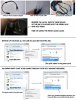
howto.jpg


This is how I am set up.

My Mic is getting sent INTO my PC, and being "listened to" OUT my Front (Green) Jack
- So the Pink cable for the Dualshock4, needs to connect to the Green Jack

The audio coming OUT of the Dualshock4 needs to go INTO my computer,
- We also need to "Listen to" the front jack with my headphones


With this set up, I only need to connect my controller to the front jacks and i'm ready to stream my consoles. When I unplug the front jacks theyre automatically disabled by windows anyway.
No messing with attaching splitters to my headsets or mics, and no trails of cables everywhere
 
howto.jpg


This is how I am set up.

My Mic is getting sent INTO my PC, and being "listened to" OUT my Front (Green) Jack
- So the Pink cable for the Dualshock4, needs to connect to the Green Jack

The audio coming OUT of the Dualshock4 needs to go INTO my computer,
- We also need to "Listen to" the front jack with my headphones


With this set up, I only need to connect my controller to the front jacks and i'm ready to stream my consoles. When I unplug the front jacks theyre automatically disabled by windows anyway.
No messing with attaching splitters to my headsets or mics, and no trails of cables everywhere

Is it possible to get us any more detailed information??
I am currently using my Astro headset with mixamp pro + blue yeti pro microphone. But somehow i still cant get the gamesound on stream..
 
I tried the above and managed to get everything working except for my mic not being heard on the PS4. My brain hurts from all the tinkering I've been doing.
 
If you're still having problems let me know.
PS4_to_OBS.jpg

I tried this set up exactly as you had it, however it never worked. I got the game and party audio to come through, though it all sounded pretty terrible, but I could never get my yeti to register as a microphone. So far the best option that I can see is to just save the Yeti for solo and computer play and just use my astro and mix amp when I'm playing with friends.
 
Personally I think the game capture card ment for recording console should incorporate this... spend $200 just to find out you need to buy a mic a new headset and a rats nest of cords to record voices... Great product but debating on getting all these. might just sell it and record pc gameplay only.
 
Its to some part a question of the outputs the console offers. And since you barely have configuration options on these closed systems, you are often doomed to such complicated setups.
 
Status
Not open for further replies.
Back
Top