KBZ
New Member
S.E.Live/OBS Multi-stream setup
Not sure what all is going on, but since the update of OBS, I have been getting this consistently.
I'm not using any CPU for encoding it's all set up for my GPU.
According to OBS Logs
My stream is currently experiencing massive performance issues because
my encoder is severely overloaded.
The stats window shows i' am losing a massive 61.0% of your frames due to encoding lag, causing your stream's output framerate to drop to an unwatchable 17.42 FPS (instead of your target 60 FPS).
I' am running AMD Ryzen 7 9800X3D CPU paired with an AMD Radeon RX 9070 XT GPU. However, my log indicates that I' am likely forcing OBS to use x264 (CPU encoding) on an overly intensive preset, (which I' am not) or your encoder settings are misconfigured,( They are not) choking the video thread before it can render or output.
This has started since an update and
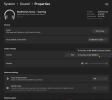
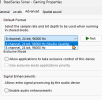
My GPU Encoder I use is set to see images.
Please help me with this issue. It just seems to be getting worse on each start up live stream.


Not sure what all is going on, but since the update of OBS, I have been getting this consistently.
I'm not using any CPU for encoding it's all set up for my GPU.
According to OBS Logs
My stream is currently experiencing massive performance issues because
my encoder is severely overloaded.
The stats window shows i' am losing a massive 61.0% of your frames due to encoding lag, causing your stream's output framerate to drop to an unwatchable 17.42 FPS (instead of your target 60 FPS).
I' am running AMD Ryzen 7 9800X3D CPU paired with an AMD Radeon RX 9070 XT GPU. However, my log indicates that I' am likely forcing OBS to use x264 (CPU encoding) on an overly intensive preset, (which I' am not) or your encoder settings are misconfigured,( They are not) choking the video thread before it can render or output.
This has started since an update and
My GPU Encoder I use is set to see images.
Please help me with this issue. It just seems to be getting worse on each start up live stream.