


sumirecccp
New Member
PROBLEM SOLVED.
JUST CLOSE THE DESTINATION FOLDER'S NTFS COMPRESS FUNCTION.
=========
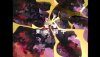
hello, my graphic card is RTX2080, and when I set framerate to 60, I will get some ramdom gray mosaic.
ffplay log:
[hevc @ 00000298ed20c3c0] Could not find ref with POC 1230B f=0/0
[hevc @ 00000298ed20c3c0] Could not find ref with POC 122
[hevc @ 00000298ed34a000] Duplicate POC in a sequence: 124. f=0/0
[hevc @ 00000298ed34a000] Error parsing NAL unit #2.
[hevc @ 00000298ed34ea00] Duplicate POC in a sequence: 124.
[hevc @ 00000298ed34ea00] Error parsing NAL unit #2.
[hevc @ 00000298ed34a000] Could not find ref with POC 68 0B f=0/0
[hevc @ 00000298ed34a000] Could not find ref with POC 67
[hevc @ 00000298ed34a000] Could not find ref with POC 66
[hevc @ 00000298ed34ea00] Duplicate POC in a sequence: 69.
[hevc @ 00000298ed34ea00] Error parsing NAL unit #2.
[hevc @ 00000298ecf6f8c0] Duplicate POC in a sequence: 69.B f=0/0
[hevc @ 00000298ecf6f8c0] Error parsing NAL unit #2.
[hevc @ 00000298ecf3e480] Duplicate POC in a sequence: 69.
[hevc @ 00000298ecf3e480] Error parsing NAL unit #2.
[hevc @ 00000298ecf6f8c0] Could not find ref with POC 1520B f=0/0
[hevc @ 00000298ecf6f8c0] Could not find ref with POC 151
[hevc @ 00000298ecf6f8c0] Could not find ref with POC 150
[hevc @ 00000298ecf6f8c0] Could not find ref with POC 1490B f=0/0
[hevc @ 00000298ecf3e480] Duplicate POC in a sequence: 153.
[hevc @ 00000298ecf3e480] Error parsing NAL unit #2.
etc.
but it's ok in 30f mode, and when I try another soft Bandicam using HEVC-60fps ,there's no problem too.
Any idea to solve this problem?
ADD: OBS LOG
13:27:59.843: CPU Name: Intel(R) Core(TM) i7-4770 CPU @ 3.40GHz
13:27:59.843: CPU Speed: 3392MHz
13:27:59.843: Physical Cores: 4, Logical Cores: 8
13:27:59.843: Physical Memory: 16318MB Total, 4449MB Free
13:27:59.843: Windows Version: 10.0 Build 17763 (revision: 253; 64-bit)
13:27:59.843: Running as administrator: false
13:27:59.843: Aero is Enabled (Aero is always on for windows 8 and above)
13:27:59.843: Windows 10 Gaming Features:
13:27:59.843: Game Bar: On
13:27:59.843: Game DVR: On
13:27:59.843: Game DVR Background Recording: Off
13:27:59.843: Game Mode: On
13:27:59.847: Sec. Software Status:
13:27:59.850:
13:27:59.851:
13:27:59.851:
13:27:59.852: Browser Hardware Acceleration: true
13:27:59.852: Portable mode: false
13:28:00.128: OBS 22.0.2 (64-bit, windows)
13:28:00.128: ---------------------------------
13:28:00.133: ---------------------------------
13:28:00.133: audio settings reset:
13:28:00.133: samples per sec: 48000
13:28:00.133: speakers: 2
13:28:00.165: ---------------------------------
13:28:00.165: Initializing D3D11...
13:28:00.167: Available Video Adapters:
13:28:00.171: Adapter 1: NVIDIA GeForce RTX 2080
13:28:00.171: Dedicated VRAM: 4104126464
13:28:00.171: Shared VRAM: 4260395008
13:28:00.171: output 1: pos={0, 0}, size={3840, 2160}, attached=true
13:28:00.205: Loading up D3D11 on adapter NVIDIA GeForce RTX 2080 (0)
13:28:00.316: D3D11 loaded successfully, feature level used: 45056
13:28:01.319: ---------------------------------
13:28:01.319: video settings reset:
13:28:01.319: base resolution: 1280x720
13:28:01.319: output resolution: 1280x720
13:28:01.319: downscale filter: Lanczos
13:28:01.319: fps: 60000/1001
13:28:01.319: format: I420
13:28:01.319: YUV mode: 709/Partial
13:28:01.321: Audio monitoring device:
13:28:01.321: name: 既定
13:28:01.321: id: default
13:28:01.325: ---------------------------------
13:28:01.658: Required module function 'obs_module_load' in module '../../obs-plugins/64bit/chrome_elf.dll' not found, loading of module failed
13:28:01.676: [CoreAudio encoder]: CoreAudio AAC encoder not installed on the system or couldn't be loaded
13:28:01.817: [AMF] AMF Test failed due to one or more errors.
13:28:01.817: Failed to initialize module 'enc-amf.dll'
13:28:02.240: Required module function 'obs_module_load' in module '../../obs-plugins/64bit/libcef.dll' not found, loading of module failed
13:28:02.271: LoadLibrary failed for '../../obs-plugins/64bit/libEGL.dll': The specified procedure could not be found.
13:28:02.271: (127)
13:28:02.271: Module '../../obs-plugins/64bit/libEGL.dll' not loaded
13:28:02.350: Required module function 'obs_module_load' in module '../../obs-plugins/64bit/libGLESv2.dll' not found, loading of module failed
13:28:02.427: [obs-browser]: Version 2.1.5
13:28:02.620: NVENC supported
13:28:02.990: Couldn't find VLC installation, VLC video source disabled
13:28:03.052: No blackmagic support
13:28:03.143: ---------------------------------
13:28:03.143: Loaded Modules:
13:28:03.143: win-wasapi.dll
13:28:03.143: win-mf.dll
13:28:03.143: win-ivcam.dll
13:28:03.143: win-dshow.dll
13:28:03.143: win-decklink.dll
13:28:03.143: win-capture.dll
13:28:03.143: vlc-video.dll
13:28:03.143: text-freetype2.dll
13:28:03.143: rtmp-services.dll
13:28:03.143: obs-x264.dll
13:28:03.143: obs-vst.dll
13:28:03.143: obs-transitions.dll
13:28:03.143: obs-text.dll
13:28:03.143: obs-qsv11.dll
13:28:03.143: obs-outputs.dll
13:28:03.143: obs-filters.dll
13:28:03.143: obs-ffmpeg.dll
13:28:03.143: obs-browser.dll
13:28:03.143: image-source.dll
13:28:03.143: frontend-tools.dll
13:28:03.143: enc-amf.dll
13:28:03.143: coreaudio-encoder.dll
13:28:03.143: ---------------------------------
13:28:03.143: ==== Startup complete ===============================================
13:28:03.165: All scene data cleared
13:28:03.165: ------------------------------------------------
13:28:03.192: [window-capture: 'ウィンドウキャプチャ'] update settings:
13:28:03.192: executable: firefox.exe
13:28:03.234: WASAPI: Device 'VoiceMeeter Output (VB-Audio Cable A)' initialized
13:28:03.234: Switched to scene 'シーン'
13:28:03.261: ------------------------------------------------
13:28:03.261: Loaded scenes:
13:28:03.261: - scene 'シーン':
13:28:03.261: - source: 'ウィンドウキャプチャ' (window_capture)
13:28:03.261: - source: '音声入力キャプチャ' (wasapi_input_capture)
13:28:03.261: ------------------------------------------------
13:28:03.282: adding 64 milliseconds of audio buffering, total audio buffering is now 64 milliseconds
13:28:03.900: CalculateFileHash: Failed to open file 'C:\Users\Snowball\AppData\Roaming\obs-studio\updates\whatsnew.json':
13:28:07.579: ---------------------------------
13:28:07.579: video settings reset:
13:28:07.579: base resolution: 1920x1080
13:28:07.579: output resolution: 1920x1080
13:28:07.579: downscale filter: Lanczos
13:28:07.579: fps: 60000/1001
13:28:07.579: format: I420
13:28:07.579: YUV mode: 709/Partial
13:28:07.585: Audio monitoring device:
13:28:07.585: name: 既定
13:28:07.585: id: default
13:28:07.600: Switched to profile '1920x1080 hevc' (1920x1080_hevc)
13:28:07.600: ------------------------------------------------
13:29:05.194: Switched to scene '(null)'
13:29:05.194: WASAPI: Device 'VoiceMeeter Output (VB-Audio Cable A)' Terminated
13:29:05.199: All scene data cleared
13:29:05.199: ------------------------------------------------
13:29:05.200: [window-capture: 'ウィンドウキャプチャ'] update settings:
13:29:05.200: executable: firefox.exe
13:29:05.222: WASAPI: Device 'VoiceMeeter Output (VB-Audio Cable A)' initialized
13:29:05.224: Switched to scene 'シーン'
13:29:05.224: ------------------------------------------------
13:29:05.225: Loaded scenes:
13:29:05.225: - scene 'シーン':
13:29:05.225: - source: 'ウィンドウキャプチャ' (window_capture)
13:29:05.225: - source: '音声入力キャプチャ' (wasapi_input_capture)
13:29:05.225: ------------------------------------------------
13:29:05.235: Switched to scene collection 'channel1080' (channel1080.json)
13:29:05.235: ------------------------------------------------
13:29:15.007: ==== Recording Start ===============================================
13:30:39.924: Output 'adv_ffmpeg_output': stopping
13:30:39.924: Output 'adv_ffmpeg_output': Total frames output: 5086
13:30:39.924: Output 'adv_ffmpeg_output': Total drawn frames: 5162
13:30:39.925: ==== Recording Stop ================================================
JUST CLOSE THE DESTINATION FOLDER'S NTFS COMPRESS FUNCTION.
=========
hello, my graphic card is RTX2080, and when I set framerate to 60, I will get some ramdom gray mosaic.
ffplay log:
[hevc @ 00000298ed20c3c0] Could not find ref with POC 1230B f=0/0
[hevc @ 00000298ed20c3c0] Could not find ref with POC 122
[hevc @ 00000298ed34a000] Duplicate POC in a sequence: 124. f=0/0
[hevc @ 00000298ed34a000] Error parsing NAL unit #2.
[hevc @ 00000298ed34ea00] Duplicate POC in a sequence: 124.
[hevc @ 00000298ed34ea00] Error parsing NAL unit #2.
[hevc @ 00000298ed34a000] Could not find ref with POC 68 0B f=0/0
[hevc @ 00000298ed34a000] Could not find ref with POC 67
[hevc @ 00000298ed34a000] Could not find ref with POC 66
[hevc @ 00000298ed34ea00] Duplicate POC in a sequence: 69.
[hevc @ 00000298ed34ea00] Error parsing NAL unit #2.
[hevc @ 00000298ecf6f8c0] Duplicate POC in a sequence: 69.B f=0/0
[hevc @ 00000298ecf6f8c0] Error parsing NAL unit #2.
[hevc @ 00000298ecf3e480] Duplicate POC in a sequence: 69.
[hevc @ 00000298ecf3e480] Error parsing NAL unit #2.
[hevc @ 00000298ecf6f8c0] Could not find ref with POC 1520B f=0/0
[hevc @ 00000298ecf6f8c0] Could not find ref with POC 151
[hevc @ 00000298ecf6f8c0] Could not find ref with POC 150
[hevc @ 00000298ecf6f8c0] Could not find ref with POC 1490B f=0/0
[hevc @ 00000298ecf3e480] Duplicate POC in a sequence: 153.
[hevc @ 00000298ecf3e480] Error parsing NAL unit #2.
etc.
but it's ok in 30f mode, and when I try another soft Bandicam using HEVC-60fps ,there's no problem too.
Any idea to solve this problem?
ADD: OBS LOG
13:27:59.843: CPU Name: Intel(R) Core(TM) i7-4770 CPU @ 3.40GHz
13:27:59.843: CPU Speed: 3392MHz
13:27:59.843: Physical Cores: 4, Logical Cores: 8
13:27:59.843: Physical Memory: 16318MB Total, 4449MB Free
13:27:59.843: Windows Version: 10.0 Build 17763 (revision: 253; 64-bit)
13:27:59.843: Running as administrator: false
13:27:59.843: Aero is Enabled (Aero is always on for windows 8 and above)
13:27:59.843: Windows 10 Gaming Features:
13:27:59.843: Game Bar: On
13:27:59.843: Game DVR: On
13:27:59.843: Game DVR Background Recording: Off
13:27:59.843: Game Mode: On
13:27:59.847: Sec. Software Status:
13:27:59.850:
13:27:59.851:
13:27:59.851:
13:27:59.852: Browser Hardware Acceleration: true
13:27:59.852: Portable mode: false
13:28:00.128: OBS 22.0.2 (64-bit, windows)
13:28:00.128: ---------------------------------
13:28:00.133: ---------------------------------
13:28:00.133: audio settings reset:
13:28:00.133: samples per sec: 48000
13:28:00.133: speakers: 2
13:28:00.165: ---------------------------------
13:28:00.165: Initializing D3D11...
13:28:00.167: Available Video Adapters:
13:28:00.171: Adapter 1: NVIDIA GeForce RTX 2080
13:28:00.171: Dedicated VRAM: 4104126464
13:28:00.171: Shared VRAM: 4260395008
13:28:00.171: output 1: pos={0, 0}, size={3840, 2160}, attached=true
13:28:00.205: Loading up D3D11 on adapter NVIDIA GeForce RTX 2080 (0)
13:28:00.316: D3D11 loaded successfully, feature level used: 45056
13:28:01.319: ---------------------------------
13:28:01.319: video settings reset:
13:28:01.319: base resolution: 1280x720
13:28:01.319: output resolution: 1280x720
13:28:01.319: downscale filter: Lanczos
13:28:01.319: fps: 60000/1001
13:28:01.319: format: I420
13:28:01.319: YUV mode: 709/Partial
13:28:01.321: Audio monitoring device:
13:28:01.321: name: 既定
13:28:01.321: id: default
13:28:01.325: ---------------------------------
13:28:01.658: Required module function 'obs_module_load' in module '../../obs-plugins/64bit/chrome_elf.dll' not found, loading of module failed
13:28:01.676: [CoreAudio encoder]: CoreAudio AAC encoder not installed on the system or couldn't be loaded
13:28:01.817: [AMF] AMF Test failed due to one or more errors.
13:28:01.817: Failed to initialize module 'enc-amf.dll'
13:28:02.240: Required module function 'obs_module_load' in module '../../obs-plugins/64bit/libcef.dll' not found, loading of module failed
13:28:02.271: LoadLibrary failed for '../../obs-plugins/64bit/libEGL.dll': The specified procedure could not be found.
13:28:02.271: (127)
13:28:02.271: Module '../../obs-plugins/64bit/libEGL.dll' not loaded
13:28:02.350: Required module function 'obs_module_load' in module '../../obs-plugins/64bit/libGLESv2.dll' not found, loading of module failed
13:28:02.427: [obs-browser]: Version 2.1.5
13:28:02.620: NVENC supported
13:28:02.990: Couldn't find VLC installation, VLC video source disabled
13:28:03.052: No blackmagic support
13:28:03.143: ---------------------------------
13:28:03.143: Loaded Modules:
13:28:03.143: win-wasapi.dll
13:28:03.143: win-mf.dll
13:28:03.143: win-ivcam.dll
13:28:03.143: win-dshow.dll
13:28:03.143: win-decklink.dll
13:28:03.143: win-capture.dll
13:28:03.143: vlc-video.dll
13:28:03.143: text-freetype2.dll
13:28:03.143: rtmp-services.dll
13:28:03.143: obs-x264.dll
13:28:03.143: obs-vst.dll
13:28:03.143: obs-transitions.dll
13:28:03.143: obs-text.dll
13:28:03.143: obs-qsv11.dll
13:28:03.143: obs-outputs.dll
13:28:03.143: obs-filters.dll
13:28:03.143: obs-ffmpeg.dll
13:28:03.143: obs-browser.dll
13:28:03.143: image-source.dll
13:28:03.143: frontend-tools.dll
13:28:03.143: enc-amf.dll
13:28:03.143: coreaudio-encoder.dll
13:28:03.143: ---------------------------------
13:28:03.143: ==== Startup complete ===============================================
13:28:03.165: All scene data cleared
13:28:03.165: ------------------------------------------------
13:28:03.192: [window-capture: 'ウィンドウキャプチャ'] update settings:
13:28:03.192: executable: firefox.exe
13:28:03.234: WASAPI: Device 'VoiceMeeter Output (VB-Audio Cable A)' initialized
13:28:03.234: Switched to scene 'シーン'
13:28:03.261: ------------------------------------------------
13:28:03.261: Loaded scenes:
13:28:03.261: - scene 'シーン':
13:28:03.261: - source: 'ウィンドウキャプチャ' (window_capture)
13:28:03.261: - source: '音声入力キャプチャ' (wasapi_input_capture)
13:28:03.261: ------------------------------------------------
13:28:03.282: adding 64 milliseconds of audio buffering, total audio buffering is now 64 milliseconds
13:28:03.900: CalculateFileHash: Failed to open file 'C:\Users\Snowball\AppData\Roaming\obs-studio\updates\whatsnew.json':
13:28:07.579: ---------------------------------
13:28:07.579: video settings reset:
13:28:07.579: base resolution: 1920x1080
13:28:07.579: output resolution: 1920x1080
13:28:07.579: downscale filter: Lanczos
13:28:07.579: fps: 60000/1001
13:28:07.579: format: I420
13:28:07.579: YUV mode: 709/Partial
13:28:07.585: Audio monitoring device:
13:28:07.585: name: 既定
13:28:07.585: id: default
13:28:07.600: Switched to profile '1920x1080 hevc' (1920x1080_hevc)
13:28:07.600: ------------------------------------------------
13:29:05.194: Switched to scene '(null)'
13:29:05.194: WASAPI: Device 'VoiceMeeter Output (VB-Audio Cable A)' Terminated
13:29:05.199: All scene data cleared
13:29:05.199: ------------------------------------------------
13:29:05.200: [window-capture: 'ウィンドウキャプチャ'] update settings:
13:29:05.200: executable: firefox.exe
13:29:05.222: WASAPI: Device 'VoiceMeeter Output (VB-Audio Cable A)' initialized
13:29:05.224: Switched to scene 'シーン'
13:29:05.224: ------------------------------------------------
13:29:05.225: Loaded scenes:
13:29:05.225: - scene 'シーン':
13:29:05.225: - source: 'ウィンドウキャプチャ' (window_capture)
13:29:05.225: - source: '音声入力キャプチャ' (wasapi_input_capture)
13:29:05.225: ------------------------------------------------
13:29:05.235: Switched to scene collection 'channel1080' (channel1080.json)
13:29:05.235: ------------------------------------------------
13:29:15.007: ==== Recording Start ===============================================
13:30:39.924: Output 'adv_ffmpeg_output': stopping
13:30:39.924: Output 'adv_ffmpeg_output': Total frames output: 5086
13:30:39.924: Output 'adv_ffmpeg_output': Total drawn frames: 5162
13:30:39.925: ==== Recording Stop ================================================
Attachments
Last edited:

