Question / Help PLEASE HELP MONITOR CAPTURE TROUBLES

Dyllon

New Member
Whenever I begin streaming / preview streaming this happens. Everything's fine until 30fps (I can do 60 but I do 30) and then if I switch to a scene with a monitor capture it goes BOOM right to 15. . .No explanation Aero is Disabled and I still can't figure it out... PLEASE HELP ASAP I stream 40 hours a week and I need this fixed I've had complaints in my stream.


INFO - It switches to 15 FPS ONLY when I use a scene with a monitor capture or turn on monitor capture until then ZERO problems. It stays at 15-16 FPS as if I have it set to 15...Never goes back to 30 EVEN if I switch back to another scene or turn off the capture for the stream. The only way it goes back to 30FPS is if I end the stream and restart it staying away from the Monitor capture scene PLEASE help!

www.stream.me/iammrdisaster It's stopping me from streaming ANY xbox one games.
 

Attachments

  • without monitor on.jpg
    without monitor on.jpg
    180.3 KB · Views: 112
  • with monitor.jpg
    with monitor.jpg
    267.5 KB · Views: 104
  • BOTH MONITOR.jpg
    BOTH MONITOR.jpg
    511.8 KB · Views: 104
First of all having multiple Capture Sources in a Single Scene usually does more harm than good.
Second of all you are on w10 you cant just disable AERO.

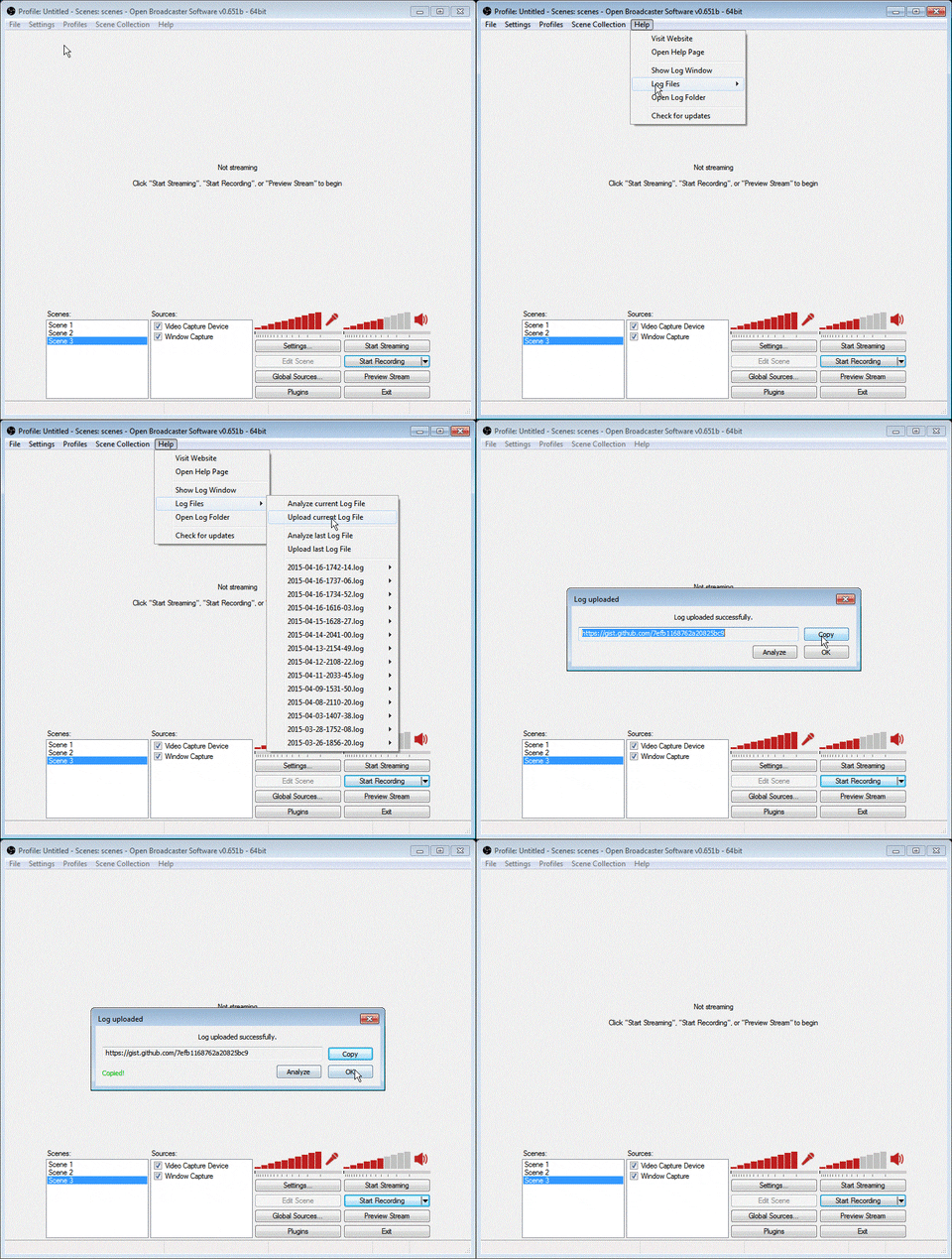
Please post a Logfile for a proper investigation
 
The only othe "capture" is my facecam the rest are either images or Donation / sub tickers and such.Is this what you're looking for


: CLRHost:: Browser 9: Status message:
03:23:05: CLRHost:: Browser 10: Status message:
03:23:16: Using Monitor Capture
03:23:28: Total frames encoded: 741, total frames duplicated: 182 (24.56%)
03:23:28: Total frames rendered: 587, number of late frames: 179 (30.49%) (it's okay for some frames to be late)
 
The only othe "capture" is my facecam the rest are either images or Donation / sub tickers and such.Is this what you're looking for


: CLRHost:: Browser 9: Status message:
03:23:05: CLRHost:: Browser 10: Status message:
03:23:16: Using Monitor Capture
03:23:28: Total frames encoded: 741, total frames duplicated: 182 (24.56%)
03:23:28: Total frames rendered: 587, number of late frames: 179 (30.49%) (it's okay for some frames to be late)
That Logfile is incomplete.

And your naming Scheme is quite missleading in that Case :P
 
Lol box is literally a BLACK box to go under the PNG face cam overlay so My donations & subs have a black background because it's cut out in the actual overlay and they're UNDER everything else. Sorry
 
Yes I know but it had personal information I didn't wanna give it all to someone I don't know but what do I do /can you do?
 
Post the logfile. We need it to be able to help any further. If you're worried about showing your real name (in userprofile filepaths) just edit the textfile and do a find-and-replace. Otherwise, we need the whole thing and it should not contain any private information.
 
Determining the cause of the issue. That's like asking a mechanic why they need to pop the hood to find out what's wrong with your car. Either send a full logfile (even edited to remove your real name), or accept a 'good luck, you'll need it'.
 
I will shortly I am at a loss to why it would drop in the monitor but not the other scenes and won't go back up after I leave the monitor scene
 
UPDATE: I can't use xSplit on Stream.me but there's a thing called "screen grab" on xSplit that allows me to use my mouse to highlight a random chunk (no matter the size) of my monitor and it captures ANYTHING in that chunk...Including the xbox app in windowed mode. It also runs at 30FPS please tell me there's something like that for OBS
 
That's not the problem I've done all that if monitor capture I'd on it INSTANTLY drops to 15 and weird part is it doesn't always lag at 15 sometimes it looks perfect it just sucks that I can't disable Aero on windows 10
 
You're deluding yourself if you think not being able to disable aero on windows 10 is even remotely related to your issue.

Windows 7 had SEVERE problems with monitor capture with aero enabled. Windows 8 not only made it so you can't turn aero off, it completely resolved those problems.

Is your video card running in pci-e x16 mode?
 
Such a kind way to tell me that. As for the video card I have no idea but I do know literally EVERYTHING else works. I have to use the windows 10 Xbox app cause at the moment I cannot afford a capture card and sadly the only way to capture the Xbox app is with a monitor capture
 
I just need one of two things. 1. A way to make Monitor Captures WORK without dropping my FPS... OR 2. a way to capture the xbox one app (windowed mode preferably) on OBS So far I can't find a way to do that.
 
Back
Top