Question / Help Suggestion for my record settings

Laela

New Member
Hi,

I would like to have suggestion of what settings i should use for recording.

I tried to record 1080p with 60FPS but somehow i get encoding overloaded problem with these settings:
https://obsproject.com/forum/thread...ty-recording-and-multiple-audio-tracks.33030/
https://obsproject.com/forum/threads/obs-classic-how-to-make-high-quality-local-recordings.12600/

My computer specs are:
i7 6700k
EVGA 1070
16GB corsair vengeance
Crucial MX300 525gb SSD
and just to store my videos o have a regular 1TB HDD

When i used the settings above i got encoding overloads and 1-2min to recording my computer just freezes and i have to reboot... I tried to post log of this before but apparently it doesn't save any helpful info. Says that recording wasn't even started. (https://obsproject.com/forum/threads/computer-crash-when-recording.59660/#post-259301)

Simple mode recording worked alright with 720p and indistinguishable quality, but i would really love to have multiple audio tracks... now that i finally figured out how voicemeeter banana works.

I don't mind recording 720p either if i just get the recording work perfectly with the audio tracks. I just can't believe that my setup wouldn't have enough kick for 1080p recording?

Thanks in advance, let me know if i have to provide any other info.

- LAELA
 
http://imgur.com/a/kj8qt
If i set those setting i get encoding overloaded. Whatever settings i use with 1080p i get it. With 720p recording i can get the recording to work without error but the video isn't that good looking..
 
Actually just noticed that i get encoding overloaded even with simple settings. Format:mkv, encoder:x264, Quality:Indistinguishable...

What does it mean, can it hurt my computer, is there anything i need to worry?
 
Can't really get it to work with 720p either. I'm not even sure i never had it to work with any settings without the encoding overload error.
Does it really matter if there pops up that message? Should i figure out the way to get rid of it or?
 
I don't know you really shouldn't be getting that message with a PC like that. Can you upload a new log where you are getting the issue?
 
I don't know you really shouldn't be getting that message with a PC like that. Can you upload a new log where you are getting the issue?
Ill get a log file for you once i get home. What settings i should use? I could go simple and 720p with indistinguishable and see what happens. Those were the settings i used at the beginning. After i raised the resolution output to 1080 and other settings like all guides have i have been getting this error.
 
I don't know you really shouldn't be getting that message with a PC like that. Can you upload a new log where you are getting the issue?
Should i also wait for computer to crash and then upload the log? Or is it enough that i start recording, and after encoding overload error pops -> stop recording and upload then?
 
I just uninstalled and installed it again. Didn't help. With mkv, x264, CRF -18, ultrafast, profile:high and at the "advanced" tab i changed the renderer to OpenGL from Direct3d.

edit: And with 50fps

Never ever change the renderer on Windows, the Direct3d renderer has the best performance.
1080p 60fps encoding is still pretty cpu-intensive, especially while also running a game.
Check your cpu usage in windows while you are recording and playing a game.
 
Never ever change the renderer on Windows, the Direct3d renderer has the best performance.
1080p 60fps encoding is still pretty cpu-intensive, especially while also running a game.
Check your cpu usage in windows while you are recording and playing a game.
Hi, thanks alot for reply.

I have been using the direct3d until yesterday, when i tried if it helped. I'll change it back.
I believe i had CPU usage around 20%-max70% with any settings i tried... but will check it again when i get home.

I have 2 monitors and i have been trying with chrome + several tabs open aswell, but i doubt thats the case. I tried 720p with 30fps yesterday with unbearable recording quality and i didn't get the encoding error (or just missed the short message).
 
Last edited:
Also, post the latest log of your recordings (restart OBS Studio to Upload Last log file).
It is possible that you are using outdated version of the application.
 
I don't know you really shouldn't be getting that message with a PC like that. Can you upload a new log where you are getting the issue?
Never ever change the renderer on Windows, the Direct3d renderer has the best performance.
1080p 60fps encoding is still pretty cpu-intensive, especially while also running a game.
Check your cpu usage in windows while you are recording and playing a game.
Also, post the latest log of your recordings (restart OBS Studio to Upload Last log file).
It is possible that you are using outdated version of the application.

Changed the renderer to direct3d.
Output scaled resolution: 720
FPS:60
Lanczos 32 sample
Recording quality: Indistinguishable
Format: mkv
Encoder: Software (x264)
And got overloaded again.

Log of this setup in attachments.


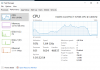
And the CPU usage:
When i started recording there was a huge spike and after it, it went down to 5-10% usage... So i doubt the CPU usage causes the problem. (There might be the error from the spike, but that doesn't tell why my computer crashes in 5min of the recording. Usage stabilizes to 5-15% after the spike).
 

Attachments

Never ever change the renderer on Windows, the Direct3d renderer has the best performance.
1080p 60fps encoding is still pretty cpu-intensive, especially while also running a game.
Check your cpu usage in windows while you are recording and playing a game.

Here is picture of CPU usage while ingame recording with settings above^^
It stabilized at somewhat 65% while recording arma2 with the highest graphic settings.
 

Attachments

  • Capture.PNG
    Capture.PNG
    32.1 KB · Views: 34
The log looks fine for the most part. Why are you not using NVENC CQP? Its just like x264 CRF but uses much less CPU because its GPU.
 
Back
Top