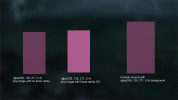
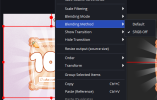
Items with semi-transparent background (especially light/vibrant colors) look grayish. Images with same features looks like that as well before applyng setting "Apply alpha in linear space". Is there ANY WAY so get the same effect for a browser source?
I tried to look for solution on browser source side but any transparency of any kind (svg/image/canva/anything) is getting mixed with gray so what is there is solution on OBS side?
I tried to look for solution on browser source side but any transparency of any kind (svg/image/canva/anything) is getting mixed with gray so what is there is solution on OBS side?