

After some digging I think I got what you meant :) Thank you so much!`Set to macro property` is what you need. Then `File content`. `Set to condition value` with proper condition could also work, but this is much cleaner.
You are using an out of date browser. It may not display this or other websites correctly.
You should upgrade or use an alternative browser.
You should upgrade or use an alternative browser.

Advanced Scene Switcher 1.37.2
- Thread starter Warmuptill
- Start date

PNO
New Member
Hi @Warmuptill, Is there a function that allows us to toggle conditions on/off within the actions of a macro?Quick question:
Can we toggle conditions on/off within the actions of a MACRO?
Thank you,
I believe the thing you are looking for is under Macro on then section where you can select from the drop down menu to Toggle action (Enable action / Disable action /... + ) and can even specify which action you want to disable based on the number.Hi @Warmuptill, Is there a function that allows us to toggle conditions on/off within the actions of a macro?
For example this Macro is set to 1 and will toggle the switch condition above it which is the Variable. If it was on 2 it would toggle the Macro since its the 2nd one in order. Macro 8 is basically the naming of the Macro you want this to be applied to.
Last edited:

Destroy666
Member
Hi @Warmuptill, Is there a function that allows us to toggle conditions on/off within the actions of a macro?
Do you mean action that turns off some macro conditions? If so, I remember this being a feature request https://github.com/WarmUpTill/SceneSwitcher/issues/974 - they can't be turned off in the 1st place, only actions can. You need to currently use a variable (e.g. SomeConditionEnabled) and proper if condition priority for checking it to work around it.

attaboyBrad
Member
Is there any documentation available for the RUN action in advss? I'm trying to find *any* way to automatically re-select the correct window capture sources for MacOS Window Capture when I launch OBS.
I have a script (appended below) that returns the window ID when I run it in terminal, and have confirmed it's the same ID that advss returns when I click "get current" after manually selecting the intended window, but when I try to run the script from advss, the only output I can seem to get is the "Process ID" of the running script. Everything else is just blank when I try to view it either as a variable or "set" the Standard or Error Output as a property of the source.
The best I can do for now is get advss to at least open the "properties" dialog automatically when the relevant app runs so I can select the window manually--and for that I'm very grateful as lacking "Window Match Priority" for MacOS screen capture has been a yearslong hassle at this point and it appears to be deliberately omitted. Apparently it used to be available in the deprecated Window Capture source options, but it seems to be gone now.
Grateful for any suggestions.
I have a script (appended below) that returns the window ID when I run it in terminal, and have confirmed it's the same ID that advss returns when I click "get current" after manually selecting the intended window, but when I try to run the script from advss, the only output I can seem to get is the "Process ID" of the running script. Everything else is just blank when I try to view it either as a variable or "set" the Standard or Error Output as a property of the source.
The best I can do for now is get advss to at least open the "properties" dialog automatically when the relevant app runs so I can select the window manually--and for that I'm very grateful as lacking "Window Match Priority" for MacOS screen capture has been a yearslong hassle at this point and it appears to be deliberately omitted. Apparently it used to be available in the deprecated Window Capture source options, but it seems to be gone now.
Grateful for any suggestions.
#!/bin/zsh
# Get the Notability window ID (excluding "Window" title)
WINDOW_ID=$(/opt/homebrew/bin/yabai -m query --windows | /opt/homebrew/bin/jq -r '.[] | select(.app=="Notability" and .title != "Window") | .id' | head -n 1)
# Log for debugging
echo "Yabai Output: $WINDOW_ID" > /tmp/yabai_debug.log
# Force output to stdout
echo $WINDOW_ID

Addiefied
New Member
Hi, I'm experiencing issues on advanced scene switcher on macOS. I've made a macro which open up the interaction menu and is supposed to do hotkey CTRL+Return, but for some reason its not toggling that hotkey inside of the interaction menu that opens. I've tested it on my windows system and it works great there. What could be the workaround for this?

Destroy666
Member
Is there any documentation available for the RUN action in advss? I'm trying to find *any* way to automatically re-select the correct window capture sources for MacOS Window Capture when I launch OBS.
I have a script (appended below) that returns the window ID when I run it in terminal, and have confirmed it's the same ID that advss returns when I click "get current" after manually selecting the intended window, but when I try to run the script from advss, the only output I can seem to get is the "Process ID" of the running script. Everything else is just blank when I try to view it either as a variable or "set" the Standard or Error Output as a property of the source.
The best I can do for now is get advss to at least open the "properties" dialog automatically when the relevant app runs so I can select the window manually--and for that I'm very grateful as lacking "Window Match Priority" for MacOS screen capture has been a yearslong hassle at this point and it appears to be deliberately omitted. Apparently it used to be available in the deprecated Window Capture source options, but it seems to be gone now.
Grateful for any suggestions.
No documentation needed. Do you have `Wait for process exit or at most` option ticked in the action? There's a hint there that it has to be ticked for macro properties to work, since if you don't wait the process is detached and this plugin has no control over it. Well, it could be read in theory, but to not disturb the flow of actions it'd need to wait for process to finish anyways. Would be great to also add that info when selecting the affected macro properties, but no such capability as of now.
Last edited:
attaboyBrad
Member
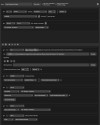
I do have that option ticked. No joy.No documentation needed. Do you have `Wait for process exit or at most` option ticked in the action? There's a hint there that it has to be ticked for macro properties to work, since if you don't wait the process is detached and this plugin has no control over it. Well, it could be read in theory, but to not disturb the flow of actions it'd need to wait for process to finish anyways. Would be great to also add that info when selecting the affected macro properties, but no such capability as of now.
Oh, dang it. I hadn't made the script executable! I'd just been running the Yabai command, which worked, and not the script itself!
Figures. Sorry to waste your time.
Attachments
Last edited:
dcchapman7
New Member
I just tried installing the Advanced Scene Switcher 1.28.1 universal pkg on my Mac Mini M1 that is running OBS 31.0.1 and believe I authorized all the necessary permissions in Settings and installation showed successful. When I open OBS and click on the Tools drop down I am not seeing Advance Scene Switcher as an option. If you could please follow up with any support I would appreciate it.
Warmuptill
Active Member
Can you please share an OBS log file?I just tried installing the Advanced Scene Switcher 1.28.1 universal pkg on my Mac Mini M1 that is running OBS 31.0.1 and believe I authorized all the necessary permissions in Settings and installation showed successful. When I open OBS and click on the Tools drop down I am not seeing Advance Scene Switcher as an option. If you could please follow up with any support I would appreciate it.
This might give an indication why the plugin failed to load.
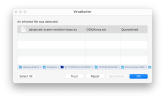
Dear WarmUpTill, without your plugin now as without hands - all lecture work is based on it. A fantastic product! But there was a problem: the antivirus program Intego, after another update of the virus databases, detected a virus in version 1.28.1. I am attaching a screenshot and really counting on your help.
Thank you!
Thank you!
Attachments
I'm not surprised. Their purpose was over about a decade ago. They're mostly theater now. They have to convince you that they're doing something and worth continuing to pay for, and so they do stuff like this....antivirus program...detected a virus in [legitimate software]
If you practice good internet hygiene yourself, you don't need third-party AV anymore. Get rid of it.
The OS itself now, handles the threats that you have nothing to do with (this is why you keep it up to date), and you don't "play in the mud" yourself.
Warmuptill
Active Member
Similar things happened in the past with other antivirus vendors, but resolved itself / were resolved after reporting the false positive.Dear WarmUpTill, without your plugin now as without hands - all lecture work is based on it. A fantastic product! But there was a problem: the antivirus program Intego, after another update of the virus databases, detected a virus in version 1.28.1. I am attaching a screenshot and really counting on your help.
Thank you!
The plugin is open source.
If you want to and are able to you can re-build the plugin yourself, which will probably be enough for it be no longer being detected:
https://github.com/WarmUpTill/SceneSwitcher/blob/master/BUILDING.md
Alternatively, if you have an GitHub account, you can try using the most recent CI build from the master branch:
master push run · WarmUpTill/SceneSwitcher@ae25b4d
An automation tool for OBS Studio. Contribute to WarmUpTill/SceneSwitcher development by creating an account on GitHub.
 github.com
Unfortunately, besides saying that there is not much I can do about it.
dcchapman7
New Member
Can you please share an OBS log file?
This might give an indication why the plugin failed to load.
I just tried installing the Advanced Scene Switcher 1.28.1 universal pkg on my Mac Mini M1 that is running OBS 31.0.1 and believe I authorized all the necessary permissions in Settings and installation showed successful. When I open OBS and click on the Tools drop down I am not seeing Advance Scene Switcher as an option. If you could please follow up with any support I would appreciate it.
20:50:04.579: [macOS] Permission for audio device access granted.
20:50:04.582: [macOS] Permission for video device access granted.
20:50:04.585: [macOS] Permission for accessibility granted.
20:50:04.589: [macOS] Permission for screen capture granted.
20:50:04.590: CPU Name: Apple M1
20:50:04.590: CPU Speed: 2400MHz
20:50:04.590: Physical Cores: 8, Logicaal Cores: 8
20:50:04.590: Physical Memory: 16384MB Total
20:50:04.590: Model Identifier: Macmini9,1
20:50:04.590: OS Name: macOS
20:50:04.590: OS Version: Version 13.6.9 (Build 22G830)
20:50:04.590: Rosetta translation used: true
20:50:04.590: Kernel Version: 22.6.0
20:50:04.591: hotkeys-cocoa: Using keyboard layout 'com.apple.keylayout.US'
20:50:04.593: Current Date/Time: 2025-03-05, 20:50:04
20:50:04.593: Browser Hardware Acceleration: true
20:50:04.593: Qt Version: 6.6.3 (runtime), 6.6.3 (compiled)
20:50:04.593: Portable mode: false
20:50:04.780: OBS 31.0.1 (mac)
20:50:04.780: ---------------------------------
20:50:04.783: ---------------------------------
20:50:04.783: audio settings reset:
20:50:04.783: samples per sec: 48000
20:50:04.783: speakers: 2
20:50:04.783: max buffering: 960 milliseconds
20:50:04.783: buffering type: dynamically increasing
20:50:04.786: ---------------------------------
20:50:04.786: Initializing OpenGL...
20:50:04.834: Loading up OpenGL on adapter Apple Apple M1
20:50:04.834: OpenGL loaded successfully, version 4.1 Metal - 83.1, shading language 4.10
20:50:05.142: ---------------------------------
20:50:05.142: video settings reset:
20:50:05.142: base resolution: 1920x1080
20:50:05.142: output resolution: 1920x1080
20:50:05.142: downscale filter: Bicubic
20:50:05.142: fps: 30/1
20:50:05.142: format: NV12
20:50:05.142: YUV mode: Rec. 709/Partial
20:50:05.143: NV12 texture support enabled
20:50:05.143: P010 texture support not available
20:50:05.143: Audio monitoring device:
20:50:05.143: name: Default
20:50:05.143: id: default
20:50:05.145: ---------------------------------
20:50:05.160: No AJA devices found, skipping loading AJA UI plugin
20:50:05.160: Failed to initialize module 'aja-output-ui'
20:50:05.173: No AJA devices found, skipping loading AJA plugin
20:50:05.173: Failed to initialize module 'aja'
20:50:05.176: Failed to load 'en-US' text for module: 'decklink-captions'
20:50:05.178: Failed to load 'en-US' text for module: 'decklink-output-ui'
20:50:05.195: Decklink API Compiled version 12.0
20:50:05.195: Decklink API Installed version 12.7.1
20:50:09.469: [obs-browser]: Version 2.24.4
20:50:09.469: [obs-browser]: CEF Version 127.0.6533.100 (runtime), 127.3.2+gf1af617+chromium-127.0.6533.100 (compiled)
20:50:09.514: [obs-websocket] [obs_module_load] you can haz websockets (Version: 5.5.4 | RPC Version: 1)
20:50:09.514: [obs-websocket] [obs_module_load] Qt version (compile-time): 6.6.3 | Qt version (run-time): 6.6.3
20:50:09.514: [obs-websocket] [obs_module_load] Linked ASIO Version: 103100
20:50:09.515: DEPRECATION: obs_frontend_get_global_config is deprecated. Read from global or user configuration explicitly instead.
20:50:09.526: [obs-websocket] [obs_module_load] Module loaded.
20:50:09.537: os_dlopen(/Applications/VLC.app/Contents/MacOS/lib/libvlccore.dylib->/Applications/VLC.app/Contents/MacOS/lib/libvlccore.dylib): dlopen(/Applications/VLC.app/Contents/MacOS/lib/libvlccore.dylib, 0x0105): tried: '/Applications/VLC.app/Contents/MacOS/lib/libvlccore.dylib' (no such file), '/System/Volumes/Preboot/Cryptexes/OS/Applications/VLC.app/Contents/MacOS/lib/libvlccore.dylib' (no such file), '/Applications/VLC.app/Contents/MacOS/lib/libvlccore.dylib' (no such file)
20:50:09.537:
20:50:09.537: [vlc-video]: Couldn't find VLC installation, VLC video source disabled
20:50:09.540: os_dlopen(/Library/Application Support/obs-studio/plugins/obs-ndi/bin/obs-ndi.so->/Library/Application Support/obs-studio/plugins/obs-ndi/bin/obs-ndi.so): dlopen(/Library/Application Support/obs-studio/plugins/obs-ndi/bin/obs-ndi.so, 0x0105): Library not loaded: @rpath/libobs.0.dylib
20:50:09.540: Referenced from: <5988A92D-E853-3766-B96D-F6F4555BF38A> /Library/Application Support/obs-studio/plugins/obs-ndi/bin/obs-ndi.so
20:50:09.540: Reason: tried: '/Users/runner/runners/2.166.4/work/1/obs-studio/build/libobs/libobs.0.dylib' (no such file), '/System/Volumes/Preboot/Cryptexes/OS/Users/runner/runners/2.166.4/work/1/obs-studio/build/libobs/libobs.0.dylib' (no such file), '/Users/runner/runners/2.166.4/work/1/s/build/../../obs-studio/build/UI/obs-frontend-api/libobs.0.dylib' (no such file), '/System/Volumes/Preboot/Cryptexes/OS/Users/runner/runners/2.166.4/work/1/s/build/../../obs-studio/build/UI/obs-frontend-api/libobs.0.dylib' (no such file), '/Users/runner/runners/2.166.4/work/1/obs-studio/build/libobs/libobs.0.dylib' (no such file), '/System/Volumes/Preboot/Cryptexes/OS/Users/runner/runners/2.166.4/work/1/obs-studio/build/libobs/libobs.0.dylib' (no such file), '/Users/runner/runners/2.166.4/work/1/s/build/../../obs-studio/build/UI/obs-frontend-api/libobs.0.dylib' (no such file), '/System/Volumes/Preboot/Cryptexes/OS/Users/runner/runners/2.166.4/work/1/s/build/../../obs-studio/build/UI/obs-frontend-api/libobs.0.dylib' (no such file), '/Applications/OBS.app/Contents/Frameworks/libobs.0.dylib' (no such file), '/Applications/OBS.app/Contents/Frameworks/libobs.0.dylib' (no such file), '/usr/lib/libobs.0.dylib' (no such file, not in dyld cache)
20:50:09.540:
20:50:09.540: Module '/Library/Application Support/obs-studio/plugins/obs-ndi/bin/obs-ndi.so' not loaded
20:50:09.541: ---------------------------------
20:50:09.541: Loaded Modules:
20:50:09.541: vlc-video
20:50:09.541: text-freetype2
20:50:09.541: rtmp-services
20:50:09.541: obs-x264
20:50:09.541: obs-websocket
20:50:09.541: obs-webrtc
20:50:09.541: obs-vst
20:50:09.541: obs-transitions
20:50:09.541: obs-outputs
20:50:09.541: obs-filters
20:50:09.541: obs-ffmpeg
20:50:09.541: obs-browser
20:50:09.541: mac-virtualcam
20:50:09.541: mac-videotoolbox
20:50:09.541: mac-syphon
20:50:09.541: mac-capture
20:50:09.541: mac-avcapture
20:50:09.541: mac-avcapture-legacy
20:50:09.541: image-source
20:50:09.541: frontend-tools
20:50:09.541: decklink
20:50:09.541: decklink-output-ui
20:50:09.541: decklink-captions
20:50:09.541: coreaudio-encoder
20:50:09.541: ---------------------------------
20:50:09.550: [VideoToolbox encoder]: Added VideoToolbox encoders
20:50:09.551: ---------------------------------
20:50:09.551: Available Encoders:
20:50:09.551: Video Encoders:
20:50:09.551: - ffmpeg_aom_av1 (AOM AV1)
20:50:09.551: - obs_x264 (x264)
20:50:09.551: - com.apple.videotoolbox.videoencoder.prores-422 (Apple VT ProRes Software Encoder)
20:50:09.551: - com.apple.videotoolbox.videoencoder.ave.avc (Apple VT H264 Hardware Encoder)
20:50:09.551: - com.apple.videotoolbox.videoencoder.h264 (Apple VT H264 Software Encoder)
20:50:09.551: - com.apple.videotoolbox.videoencoder.ave.hevc (Apple VT HEVC Hardware Encoder)
20:50:09.551: - com.apple.videotoolbox.videoencoder.hevc.vcp (Apple VT HEVC Software Encoder)
20:50:09.551: Audio Encoders:
20:50:09.551: - CoreAudio_AAC (CoreAudio AAC)
20:50:09.551: - ffmpeg_aac (FFmpeg AAC)
20:50:09.551: - ffmpeg_opus (FFmpeg Opus)
20:50:09.551: - ffmpeg_pcm_s16le (FFmpeg PCM (16-bit))
20:50:09.551: - ffmpeg_pcm_s24le (FFmpeg PCM (24-bit))
20:50:09.551: - ffmpeg_pcm_f32le (FFmpeg PCM (32-bit float))
20:50:09.551: - ffmpeg_alac (FFmpeg ALAC (24-bit))
20:50:09.551: - ffmpeg_flac (FFmpeg FLAC (16-bit))
20:50:09.551: ==== Startup complete ===============================================
20:50:09.631: All scene data cleared
20:50:09.631: ------------------------------------------------
20:50:09.640: Source ID 'ndi_source' not found
20:50:09.640: Failed to create source 'NDI™ Source'!
20:50:09.642: Switched to scene 'Scene'
20:50:09.643: ------------------------------------------------
20:50:09.643: Loaded scenes:
20:50:09.643: - scene 'Scene':
20:50:09.643: - source: 'NDI™ Source' (ndi_source)
20:50:09.643: ------------------------------------------------
20:50:09.867: [mac-virtualcam] macOS Camera Extension activated successfully.
Warmuptill
Active Member
There doesn't seem to be any indication of the plugin being even attempted to be loaded.
20:50:04.579: [macOS] Permission for audio device access granted.
20:50:04.582: [macOS] Permission for video device access granted.
20:50:04.585: [macOS] Permission for accessibility granted.
20:50:04.589: [macOS] Permission for screen capture granted.
20:50:04.590: CPU Name: Apple M1
20:50:04.590: CPU Speed: 2400MHz
20:50:04.590: Physical Cores: 8, Logicaal Cores: 8
20:50:04.590: Physical Memory: 16384MB Total
20:50:04.590: Model Identifier: Macmini9,1
20:50:04.590: OS Name: macOS
20:50:04.590: OS Version: Version 13.6.9 (Build 22G830)
20:50:04.590: Rosetta translation used: true
20:50:04.590: Kernel Version: 22.6.0
20:50:04.591: hotkeys-cocoa: Using keyboard layout 'com.apple.keylayout.US'
20:50:04.593: Current Date/Time: 2025-03-05, 20:50:04
20:50:04.593: Browser Hardware Acceleration: true
20:50:04.593: Qt Version: 6.6.3 (runtime), 6.6.3 (compiled)
20:50:04.593: Portable mode: false
20:50:04.780: OBS 31.0.1 (mac)
20:50:04.780: ---------------------------------
20:50:04.783: ---------------------------------
20:50:04.783: audio settings reset:
20:50:04.783: samples per sec: 48000
20:50:04.783: speakers: 2
20:50:04.783: max buffering: 960 milliseconds
20:50:04.783: buffering type: dynamically increasing
20:50:04.786: ---------------------------------
20:50:04.786: Initializing OpenGL...
20:50:04.834: Loading up OpenGL on adapter Apple Apple M1
20:50:04.834: OpenGL loaded successfully, version 4.1 Metal - 83.1, shading language 4.10
20:50:05.142: ---------------------------------
20:50:05.142: video settings reset:
20:50:05.142: base resolution: 1920x1080
20:50:05.142: output resolution: 1920x1080
20:50:05.142: downscale filter: Bicubic
20:50:05.142: fps: 30/1
20:50:05.142: format: NV12
20:50:05.142: YUV mode: Rec. 709/Partial
20:50:05.143: NV12 texture support enabled
20:50:05.143: P010 texture support not available
20:50:05.143: Audio monitoring device:
20:50:05.143: name: Default
20:50:05.143: id: default
20:50:05.145: ---------------------------------
20:50:05.160: No AJA devices found, skipping loading AJA UI plugin
20:50:05.160: Failed to initialize module 'aja-output-ui'
20:50:05.173: No AJA devices found, skipping loading AJA plugin
20:50:05.173: Failed to initialize module 'aja'
20:50:05.176: Failed to load 'en-US' text for module: 'decklink-captions'
20:50:05.178: Failed to load 'en-US' text for module: 'decklink-output-ui'
20:50:05.195: Decklink API Compiled version 12.0
20:50:05.195: Decklink API Installed version 12.7.1
20:50:09.469: [obs-browser]: Version 2.24.4
20:50:09.469: [obs-browser]: CEF Version 127.0.6533.100 (runtime), 127.3.2+gf1af617+chromium-127.0.6533.100 (compiled)
20:50:09.514: [obs-websocket] [obs_module_load] you can haz websockets (Version: 5.5.4 | RPC Version: 1)
20:50:09.514: [obs-websocket] [obs_module_load] Qt version (compile-time): 6.6.3 | Qt version (run-time): 6.6.3
20:50:09.514: [obs-websocket] [obs_module_load] Linked ASIO Version: 103100
20:50:09.515: DEPRECATION: obs_frontend_get_global_config is deprecated. Read from global or user configuration explicitly instead.
20:50:09.526: [obs-websocket] [obs_module_load] Module loaded.
20:50:09.537: os_dlopen(/Applications/VLC.app/Contents/MacOS/lib/libvlccore.dylib->/Applications/VLC.app/Contents/MacOS/lib/libvlccore.dylib): dlopen(/Applications/VLC.app/Contents/MacOS/lib/libvlccore.dylib, 0x0105): tried: '/Applications/VLC.app/Contents/MacOS/lib/libvlccore.dylib' (no such file), '/System/Volumes/Preboot/Cryptexes/OS/Applications/VLC.app/Contents/MacOS/lib/libvlccore.dylib' (no such file), '/Applications/VLC.app/Contents/MacOS/lib/libvlccore.dylib' (no such file)
20:50:09.537:
20:50:09.537: [vlc-video]: Couldn't find VLC installation, VLC video source disabled
20:50:09.540: os_dlopen(/Library/Application Support/obs-studio/plugins/obs-ndi/bin/obs-ndi.so->/Library/Application Support/obs-studio/plugins/obs-ndi/bin/obs-ndi.so): dlopen(/Library/Application Support/obs-studio/plugins/obs-ndi/bin/obs-ndi.so, 0x0105): Library not loaded: @rpath/libobs.0.dylib
20:50:09.540: Referenced from: <5988A92D-E853-3766-B96D-F6F4555BF38A> /Library/Application Support/obs-studio/plugins/obs-ndi/bin/obs-ndi.so
20:50:09.540: Reason: tried: '/Users/runner/runners/2.166.4/work/1/obs-studio/build/libobs/libobs.0.dylib' (no such file), '/System/Volumes/Preboot/Cryptexes/OS/Users/runner/runners/2.166.4/work/1/obs-studio/build/libobs/libobs.0.dylib' (no such file), '/Users/runner/runners/2.166.4/work/1/s/build/../../obs-studio/build/UI/obs-frontend-api/libobs.0.dylib' (no such file), '/System/Volumes/Preboot/Cryptexes/OS/Users/runner/runners/2.166.4/work/1/s/build/../../obs-studio/build/UI/obs-frontend-api/libobs.0.dylib' (no such file), '/Users/runner/runners/2.166.4/work/1/obs-studio/build/libobs/libobs.0.dylib' (no such file), '/System/Volumes/Preboot/Cryptexes/OS/Users/runner/runners/2.166.4/work/1/obs-studio/build/libobs/libobs.0.dylib' (no such file), '/Users/runner/runners/2.166.4/work/1/s/build/../../obs-studio/build/UI/obs-frontend-api/libobs.0.dylib' (no such file), '/System/Volumes/Preboot/Cryptexes/OS/Users/runner/runners/2.166.4/work/1/s/build/../../obs-studio/build/UI/obs-frontend-api/libobs.0.dylib' (no such file), '/Applications/OBS.app/Contents/Frameworks/libobs.0.dylib' (no such file), '/Applications/OBS.app/Contents/Frameworks/libobs.0.dylib' (no such file), '/usr/lib/libobs.0.dylib' (no such file, not in dyld cache)
20:50:09.540:
20:50:09.540: Module '/Library/Application Support/obs-studio/plugins/obs-ndi/bin/obs-ndi.so' not loaded
20:50:09.541: ---------------------------------
20:50:09.541: Loaded Modules:
20:50:09.541: vlc-video
20:50:09.541: text-freetype2
20:50:09.541: rtmp-services
20:50:09.541: obs-x264
20:50:09.541: obs-websocket
20:50:09.541: obs-webrtc
20:50:09.541: obs-vst
20:50:09.541: obs-transitions
20:50:09.541: obs-outputs
20:50:09.541: obs-filters
20:50:09.541: obs-ffmpeg
20:50:09.541: obs-browser
20:50:09.541: mac-virtualcam
20:50:09.541: mac-videotoolbox
20:50:09.541: mac-syphon
20:50:09.541: mac-capture
20:50:09.541: mac-avcapture
20:50:09.541: mac-avcapture-legacy
20:50:09.541: image-source
20:50:09.541: frontend-tools
20:50:09.541: decklink
20:50:09.541: decklink-output-ui
20:50:09.541: decklink-captions
20:50:09.541: coreaudio-encoder
20:50:09.541: ---------------------------------
20:50:09.550: [VideoToolbox encoder]: Added VideoToolbox encoders
20:50:09.551: ---------------------------------
20:50:09.551: Available Encoders:
20:50:09.551: Video Encoders:
20:50:09.551: - ffmpeg_aom_av1 (AOM AV1)
20:50:09.551: - obs_x264 (x264)
20:50:09.551: - com.apple.videotoolbox.videoencoder.prores-422 (Apple VT ProRes Software Encoder)
20:50:09.551: - com.apple.videotoolbox.videoencoder.ave.avc (Apple VT H264 Hardware Encoder)
20:50:09.551: - com.apple.videotoolbox.videoencoder.h264 (Apple VT H264 Software Encoder)
20:50:09.551: - com.apple.videotoolbox.videoencoder.ave.hevc (Apple VT HEVC Hardware Encoder)
20:50:09.551: - com.apple.videotoolbox.videoencoder.hevc.vcp (Apple VT HEVC Software Encoder)
20:50:09.551: Audio Encoders:
20:50:09.551: - CoreAudio_AAC (CoreAudio AAC)
20:50:09.551: - ffmpeg_aac (FFmpeg AAC)
20:50:09.551: - ffmpeg_opus (FFmpeg Opus)
20:50:09.551: - ffmpeg_pcm_s16le (FFmpeg PCM (16-bit))
20:50:09.551: - ffmpeg_pcm_s24le (FFmpeg PCM (24-bit))
20:50:09.551: - ffmpeg_pcm_f32le (FFmpeg PCM (32-bit float))
20:50:09.551: - ffmpeg_alac (FFmpeg ALAC (24-bit))
20:50:09.551: - ffmpeg_flac (FFmpeg FLAC (16-bit))
20:50:09.551: ==== Startup complete ===============================================
20:50:09.631: All scene data cleared
20:50:09.631: ------------------------------------------------
20:50:09.640: Source ID 'ndi_source' not found
20:50:09.640: Failed to create source 'NDI™ Source'!
20:50:09.642: Switched to scene 'Scene'
20:50:09.643: ------------------------------------------------
20:50:09.643: Loaded scenes:
20:50:09.643: - scene 'Scene':
20:50:09.643: - source: 'NDI™ Source' (ndi_source)
20:50:09.643: ------------------------------------------------
20:50:09.867: [mac-virtualcam] macOS Camera Extension activated successfully.
Can you check if the following folder exists?
<path to your user folder>/Library/Application Support/obs-studio/plugins/advanced-scene-switcher.plugin
dcchapman7
New Member
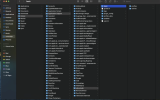
Thanks for the reply. I don't see the "plugins" folder under the Application Support/obs-studio folder. See screen shot... I believe I have given all necessary permissions to OBS in the Mac settings... not sure what to try...There doesn't seem to be any indication of the plugin being even attempted to be loaded.
Can you check if the following folder exists?
<path to your user folder>/Library/Application Support/obs-studio/plugins/advanced-scene-switcher.plugin
Attachments
Warmuptill
Active Member
In that case I think the *.pkg installer was not able to install the required files.Thanks for the reply. I don't see the "plugins" folder under the Application Support/obs-studio folder. See screen shot... I believe I have given all necessary permissions to OBS in the Mac settings... not sure what to try...
Can you try running it again?
If that also does not create the required files / folders I think you might have to manually install them using the *.zip file.
Afterwards you will have to open the terminal and run this command, as otherwise OBS will not be able to start up:
Code:
codesign --force --deep --sign - ~/Library/Application\ Support/obs-studio/plugins/advanced-scene-switcher.plugindcchapman7
New Member
Thank you for the follow up, I actually ran into a problem this morning with the OBS NDI plug in not responding (I hadn’t tried it since upgrading to OBS 31 to get advanced scene switched to work) and so I uninstalled and reinstalled OBS and reinstalled both the NDI plug in and the advanced scene switched plug in and now both are functioning! Thank you again for your time and support!In that case I think the *.pkg installer was not able to install the required files.
Can you try running it again?
If that also does not create the required files / folders I think you might have to manually install them using the *.zip file.
Afterwards you will have to open the terminal and run this command, as otherwise OBS will not be able to start up:
Code:codesign --force --deep --sign - ~/Library/Application\ Support/obs-studio/plugins/advanced-scene-switcher.plugin